No payment details required. WorkQuote Core is free.
Comparison reviewed October 13, 2026. Competitor plans and features can change; confirm current details with each provider.
Joist and WorkQuote both address a contractor’s paperwork problem: preparing professional estimates and getting invoices to customers without returning to the office. The practical difference to explore is not whether either app can produce a quote. It is how well each one supports your complete work cycle, from entering a job and pricing labor and materials to tracking customer activity, scheduling accepted work, and recording payment.
Joist has built its name around contractor estimates and invoicing, with product information covering its mobile app and web interface. WorkQuote is also mobile-first, but its paid Pro workflow links estimates to job scheduling, maps and drive-time information, interaction tracking, and business reports. WorkQuote is intended for an individual owner-operator; it does not offer employee accounts or team access.
Choose Joist if…
Joist may suit you if its estimate and invoice documents, app experience, and payment workflow already match the way you sell work. It is sensible to stay with a tool that your customers and bookkeeping process already accept, especially when custom forms or payment routines are important to your business.
Choose WorkQuote if…
Consider WorkQuote if you want estimate and invoice handling connected to a simple job record and, on Pro, scheduling, maps, interaction tracking, and reports. Core is free and includes two estimate sends monthly; Pro is available if the free send allowance or the paid workflow features match your needs.
WorkQuote vs. Joist: feature-by-feature
Compare
WorkQuote
Joist
Best fit
Individual contractors who want estimates and invoices with an owner-operated job and schedule workflow.
Contractors prioritizing Joist’s estimate and invoice experience across its mobile app and web interface.
Pricing
Core: free. Pro: $14.92/month equivalent with annual billing ($178.99/year), or $19.99 month to month.
Joist lists Basics at $10/month ($8.34 annual equivalent), Pro at $17 ($14.17 annual equivalent), and Elite at $32 ($26.67 annual equivalent). Run scheduling is listed separately at a promotional $70/month. Verify current offers and billing in Joist.
Mobile and web
WorkQuote has native iOS and Android apps and is designed for mobile field work.
Joist’s public product information and customer feedback describe both a mobile app and web interface. Verify current platform requirements in its listings.
Offline use
An internet connection is listed as a software requirement. WorkQuote is not presented as an offline-first product.
Joist’s help article says an internet connection is required. That article was last updated in 2024; verify current behavior in the version you use.
Estimates
Create branded estimates with line items, customer and job details, and status/activity tracking. Core allows two estimate sends per month; Pro includes unlimited estimates.
Joist is contractor-focused estimating software. Review its current estimate templates, document options, limits, and client approval flow against your own forms.
Invoices and payment
Create an invoice from an approved estimate and accept online payments by connecting Stripe; processing fees and terms apply.
Joist provides estimate-to-invoice conversion, payment links, and deposit requests. Its published card fee is up to 3.49% + $0.49; ACH is 1%, capped at $15. Confirm current terms and methods.
Scheduling and job visibility
Pro adds job and task scheduling plus calendar, map, and drive-time views that connect to the work you quoted.
Joist Run adds job/visit scheduling and is listed separately at a promotional $70/month. Joist emphasizes estimating and invoicing rather than dispatching; check Run availability and current price.
Free option / trial
WorkQuote Core is an ongoing free plan, not just a trial; it limits estimate sends to two per month.
Joist says its free plan is no longer available. It advertises a 14-day trial without a card; its pages differ on which tier’s features are included during the trial.
Employee accounts
Not supported. WorkQuote is designed for one owner-operator.
Confirm current Joist account and user allowances if more than one person needs to sign in.
Joist prices and features can differ by platform and change. Joist Run is listed separately from the Basics/Pro/Elite plans. WorkQuote’s annual Pro price is $178.99 paid yearly ($14.92/month equivalent); Stripe processing is separate.
Strengths and trade-offs
WorkQuote
Strengths
A no-cost Core plan lets you try the estimate and invoice workflow with two estimate sends each month.
The estimate can continue into a job record and, on Pro, a schedule, map, and activity history.
Pro pricing is published as both a monthly subscription and a lower annual monthly equivalent.
Trade-offs to consider
WorkQuote is designed for the business owner using the app; it does not provide employee logins or shared team access.
WorkQuote lists an internet connection as a requirement. Contractors working in low-signal areas should test connectivity needs before relying on it.
Its estimate templates and customer documents may not match your existing Joist forms; review a real customer-facing sample before moving.
Joist
Strengths
Joist is purpose-built around contractor estimating and invoicing, the main tasks many independent pros want to digitize first.
Joist product material describes both mobile-app and web-interface use, which can suit contractors who move between a phone and browser.
Keeping your existing Joist process avoids unnecessary customer-document changes when it already works for you.
Trade-offs to consider
There is no current ongoing free Joist tier listed; the 14-day trial and its included feature level should be confirmed on the offer shown at sign-up.
Scheduling is a separately priced Joist Run offer; compare its currently listed promotional $70/month price and scope with WorkQuote Pro if scheduling is central to your decision.
If you change products, compare your real estimate template, approval, deposit, invoice, and payment steps before moving customer records.
Look beyond the estimate PDF
Contractors often choose an estimating app because creating a quote is the most visible paperwork task. But the decision is easier when you trace a real accepted estimate. Can you see whether the customer opened it? Do you need a reminder? Where do you record the planned work date, address, notes, and expenses? How do you turn the approved amount into an invoice and record a deposit or final payment? These questions expose the day-to-day differences that a feature list can hide.
WorkQuote’s distinctive step is keeping that quoted work connected to a job record, with scheduling and map views available on Pro. That can help an owner-operator who currently keeps the estimate in one place and the work date in a separate calendar. It is not a promise of employee dispatch: WorkQuote does not support employee accounts or shared team access. If Joist already handles your actual process cleanly, including whatever scheduling method you prefer, a switch may not be worth the disruption.
Compare the client-facing documents before you migrate
A contractor’s estimate is part price, part scope agreement, and part representation of the business. Do not compare only the editor screen. Create the same sample quote in both apps with your logo, a long scope description, several labor and material lines, a tax or discount if applicable, and the terms you normally send. Inspect the phone-sized customer view, approval action, revision process, and the invoice created afterward.
Then test a payment in the manner your customers actually use. WorkQuote connects to Stripe for online invoice payments; Stripe fees and terms apply. Joist’s available payment tools, methods, and processing terms should be checked in the current offer for your account. Do not assume that a subscription price includes card processing or that funds arrive on the same schedule. Keep a copy of your existing documents and reconcile a sample payment before changing the system used for live invoices.
Understand what “free” means in each product
WorkQuote Core is an ongoing free tier with a specific boundary: two estimate sends each month. It also includes unlimited draft estimates and invoices, customers, jobs, and payment records according to the current WorkQuote pricing page. That makes Core useful for a solo contractor with occasional quotes or for testing the basic process, but the send cap matters if you routinely prepare more than two estimates.
Joist’s current public pricing information lists Basics at $10/month ($8.34/month equivalent with annual billing), Pro at $17 ($14.17 equivalent), and Elite at $32 ($26.67 equivalent), and says its former free plan is no longer available. It also advertises a 14-day trial without a card. The trial’s included tier is inconsistent across Joist’s own material, so check the actual sign-up screen. Compare the plan’s document limits, contracts & e-signatures, QuickBooks connection, and transaction fees, not just the first monthly figure.
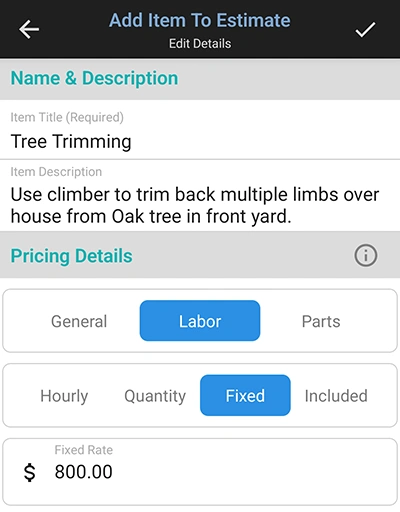
WorkQuote screenshot: entering a detailed estimate line item.
Inspect a real estimating workflow
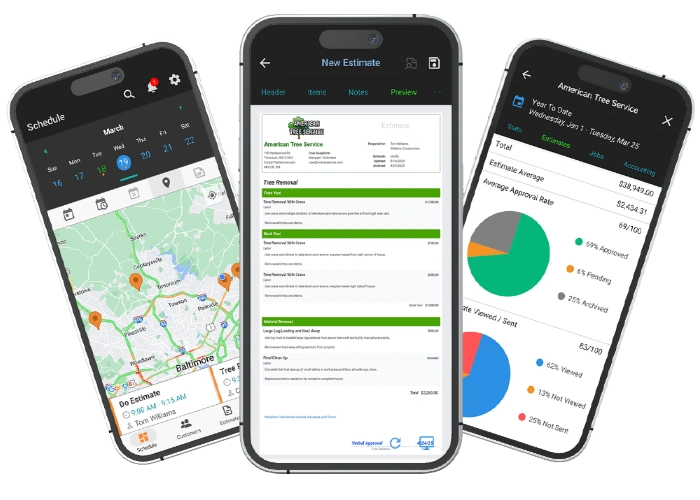
More than just a document creator. While some apps stop at generating the estimate, WorkQuote connects your paperwork directly to your calendar. The interface is built so that once a client approves a quote, scheduling the job and tracking your drive time happens in the exact same place. You get a modern dashboard that tracks the entire lifespan of the job from the first hello to the final payment.
This is a WorkQuote screenshot. Use the links provided below to inspect the current Joist interface.
A practical way to compare before switching
Build the same representative estimate in both apps using your current labor, material, tax, discount, logo, and scope details.
Check the customer’s approval experience, estimate follow-up visibility, invoice output, and how a deposit or partial payment is recorded.
Price the actual Joist plan and any Joist Run add-on you would need today, including annual billing and payment-processing terms; Run pricing may be promotional.
If scheduling and job maps matter, compare the separate Joist Run offer with WorkQuote Pro and confirm the workflows you require.
Do not switch if your required workflow depends on employee accounts or shared team access in WorkQuote.
Official product information
Pricing, included features, and availability change. Sources reviewed October 13, 2026; confirm terms directly before purchasing.
Find answers to common questions about our field service comparison software.
It may be worth comparing if you want estimates and invoices connected to customer/job records and Pro scheduling, maps, and activity tracking. Build the same estimate in both products and inspect its customer-facing version before switching; document options may differ.
Yes. WorkQuote Core is an ongoing free plan with two estimate sends per month, plus draft estimates and invoices and customer/job records. Joist says its former free plan is no longer available and advertises a 14-day trial without a card; confirm the trial features at sign-up.
WorkQuote Core is free. WorkQuote Pro is $19.99 month to month or $178.99 paid annually ($14.92 per month equivalent). Joist lists Basics at $10/month, Pro at $17/month, Elite at $32/month, and Joist Run scheduling separately at a promotional $70/month. Check current prices and included features directly with Joist.
WorkQuote Pro includes job and task scheduling, along with job map and drive-time views. It is designed for the individual owner-operator and does not provide employee accounts or team access.
Yes. Connect Stripe to accept online invoice payments. Stripe transaction fees and terms apply; check the current payment-processing terms before enabling it. Joist’s published card-processing fee is up to 3.49% plus $0.49 per transaction; verify current fees with both providers.
Try the WorkQuote mobile app
Explore the Guest Demo without creating an account.