Master Your Business Finances with Automated Reports

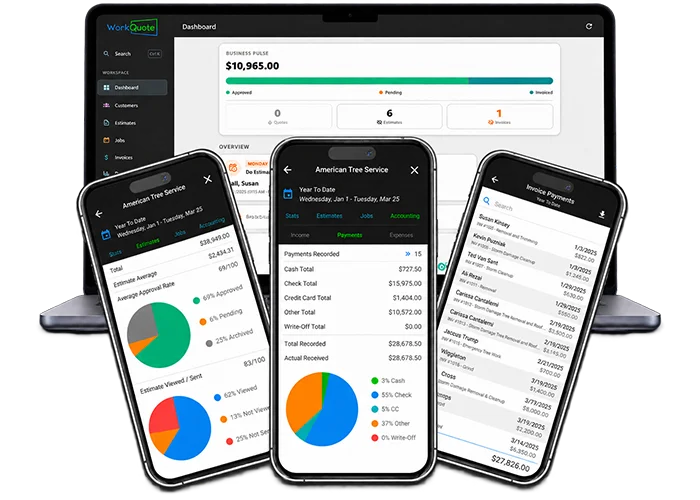
You're an expert at your trade, not an accountant. WorkQuote's reporting features provide you with a clear, comprehensive overview of your business's performance, no spreadsheets required. From tracking income and expenses to analyzing job profitability, our easy-to-read reports help you make smart, informed decisions and optimize your operations.
With customizable date ranges, detailed statistics, and visual graphs, you can gain valuable insights into your business's true financial health and confidently plan for growth.
Custom Report Range

Custom Date Ranges & Report Filters

Get the data you need for any period. Easily customize your report range to view stats for a single day, a month, or a year. You can also use multiple preset date ranges or set a preferred default. The report will include all data within your chosen range, giving you the flexibility to analyze your performance over time.

  • Customize to any date range
  • Multiple preset date ranges
  • Preferred range stays as default
  • Report includes all data in range
Multiple Preset Date Ranges
See Basic Usage Data

Business Growth Stats & Usage Data

See your business growth at a glance. View basic usage stats, including the number of customers, jobs, estimates, and invoices created within a specific date range. This information is essential for understanding your business's performance. You can also view and download all of your data.

  • See total items & itemized lists
  • Track new customers over time
  • View & download all your data
  • View all uploaded images
New Customers Over Time Graph
Get Your Estimate Approval Rate & Statistics

Estimate Win Rates & Performance

Get a clearer understanding of how your estimates are performing. Detailed reports show you the number of estimates sent, their approval rates, average time to acceptance, and the types of estimates created. This information allows you to identify trends and make informed decisions to enhance your business's profitability.

  • Multiple data points & graphs
  • Estimate approval average & rate
  • Estimate line item statistics
  • View all estimates in date range
Multiple Data Points & Graphs
Job & Invoice Reports

Job Costing & Invoice Analytics

Get a deep dive into your job and invoice data. See the total number of jobs completed, the types of jobs performed, and their contribution to your overall income. This information helps you monitor your productivity and pinpoint your most profitable services.

  • View a list of jobs in date range
  • Job completion statistics
  • Job type and billable breakdown
  • Invoice paid time & stats
Invoices Paid Time & Stats
Realized Income Reports With Profit Loss Analytics

Realized Income, Profit & Loss Data

Analyze your income from invoices, including the total amount received, the types of income generated, and how they contribute to your overall financial health. Easily track your collected tax obligations and understand your gross and net totals, minus any losses.

  • Realized income data & graphs
  • View income types and bad debt
  • Track collected tax obligations
  • Gross & net totals minus loss
Gross & Net Income Totals Minus Loss
Invoice Payment Types Breakdown

Payment Trends & Cash Flow View

Gain insights into your cash flow with a detailed payment breakdown. View total amounts received, the types of payments made (e.g., credit card, cash, check), and how they contribute to your overall income. This helps you understand payment trends and make better financial decisions.

  • Payment totals with graphs
  • Track totals for each payment type
  • View payment trends & percentages
  • Itemized payment breakdown list
Track Totals For Each Payment Type
Full Job Expense Breakdown

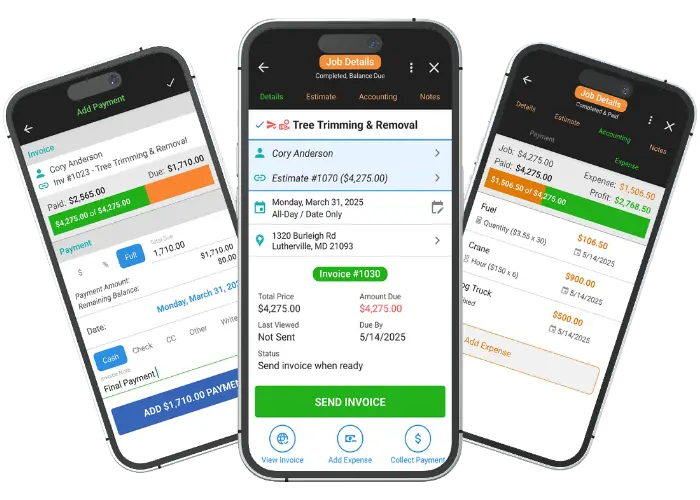
Job Expenses & Profitability Tracking

Get a clear picture of your job profitability. View your expenses in detail, including the total cost of each job, the types of expenses incurred, and how they affect your overall profit and loss. This helps you understand where your money is going and how to optimize your spending.

  • Understand your business costs
  • View Profit vs. Loss data & graphs
  • Totals with itemized breakdown
  • View expense type totals
View Expense Type Totals
View And Download Report Data

Export & Download Financial Data

You have full access to your data. View itemized lists within any report with clickable items to view the dashboard for each entry. For your personal records or tax purposes, you can download all of your report data in CSV format at any time. Your data is yours to keep.

  • View a list of data in report
  • Click a list item for its dashboard
  • Download data for any date range
  • Your data is yours to keep
Your Data Is Yours To Keep

Get 21 days of Pro. WorkQuote Core is always free.

credit_card_off

No Credit Card Required

No card or payment information is required to start.
rocket_launch

Full Feature Access

Use Pro features with your real jobs during the 21-day trial.
free_cancellation

Nothing To Cancel

At the end of the trial, your account moves to the free Core plan unless you choose to upgrade.

Service Business Reporting & Analytics FAQs

Find answers to common questions about our field service software.

WorkQuote allows you to generate essential financial reports including summaries of total income, outstanding balances, and profitability across specific timeframes. You can track all payments received and quickly identify all invoices that are overdue, ensuring better cash flow management.

Yes. The reporting features let you monitor your sales pipeline by tracking the status of all estimates Sent, Approved, or Lost. This allows you to calculate your estimate-to-job conversion rate (or win rate) and identify areas to improve your pricing strategy or sales process.

You can record job expenses and review income and expense reports. Use those records to compare work over time and discuss your business finances with your bookkeeper or accountant.

WorkQuote keeps financial records and reports in one place. You can export available data to share with your bookkeeper or accountant. Confirm with them which records they need for tax preparation.

WorkQuote keeps customer records and job history together. Review past work when preparing a follow-up or discussing a recurring service with a customer.

Run your business from anywhere.

Use WorkQuote on your computer, or download the mobile app from the App Store or Google Play. Your account works across all versions.

Available for iOS & Android

WorkQuote Web

Start now - No download needed.

For iPhone or Android, visit Download App.

Check Out More WorkQuote Features

Choose a feature to see how it works.

Features Overview