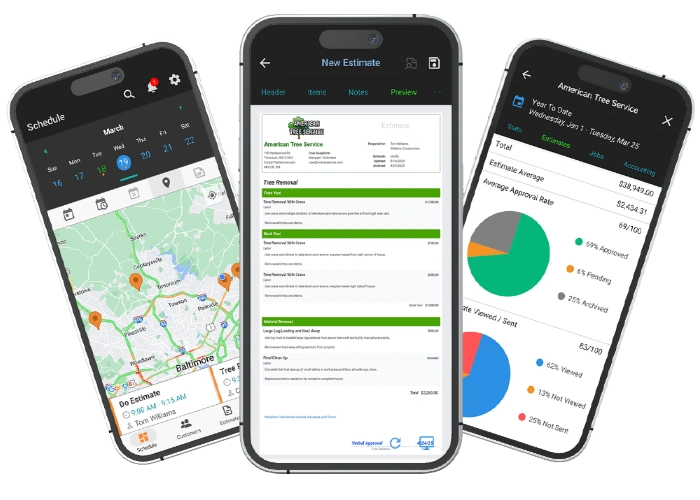
No payment details required. WorkQuote Core is free.
Comparison reviewed October 13, 2026. Competitor plans and features can change; confirm current details with each provider.
Jobber and WorkQuote both help service businesses move from customer requests to estimates and paid work, but they are built around different operating models. Jobber is a broader field-service platform for organizing customers, jobs, schedules, and teams. WorkQuote is a mobile app built around the owner-operator: prepare an estimate, follow its status, schedule the approved work, and invoice the customer without adopting a larger back-office system.
That distinction matters more than a feature checklist. If you need employee logins, multi-person dispatch, or the wider operations environment you already use in Jobber, WorkQuote is not a replacement. If you run the work yourself and are primarily comparing the cost and effort of estimates, invoices, customer records, and basic scheduling, the free WorkQuote Core plan gives you a way to evaluate that narrower workflow.
Choose Jobber if…
Jobber is the stronger fit when you need an established field-service system to coordinate more than one person, manage a wider range of operational workflows, or retain a Jobber-specific process or integration. Its broader scope may be worth the additional subscription cost when those tools are part of daily operations.
Choose WorkQuote if…
WorkQuote is worth considering when you are the person quoting, scheduling, and completing the work. Core is free for a light estimate-and-invoice workflow; Pro adds unlimited estimates and invoices, scheduling, maps and drive-time information, interaction tracking, and reports. It does not support employee accounts or team access.
WorkQuote vs. Jobber: feature-by-feature
Compare
WorkQuote
Jobber
Best fit
Individual owner-operators managing their own customer work from a mobile device.
Service businesses that want a broader job-management platform, including workflows for teams.
Published software plans
Core: $0. Pro: $14.92/month equivalent when billed annually ($178.99/year), or $19.99 month to month.
Jobber Core for one user: $29/month billed annually or $49 month to month. Connect: $99/$139; Grow: $149/$199 (annual-billed monthly equivalent/monthly billing). Plus is sales-assisted. Confirm current quotes and plan limits.
Additional users
WorkQuote does not support employee accounts or shared team access.
Jobber lists additional users at $29/month on Connect, Grow, and Plus. Core is listed as a one-user plan without an add-user option.
Mobile app
Native iOS and Android apps. WorkQuote is designed for field use.
Jobber offers mobile apps for field-service workflows. Check the app listing and plan details for current platform requirements.
Internet / offline work
WorkQuote lists an internet connection as a software requirement. Do not assume offline use; confirm connectivity at your job sites.
Jobber says the loaded app can cache that day’s schedule as read-only. Editing and visit timers require internet; cached data is removed when logged out or the app is fully closed.
Estimates and invoices
Core includes two estimate sends each month plus unlimited draft estimates and invoices. Pro includes unlimited estimates and invoices; an approved estimate can continue into the job and invoice workflow.
Jobber supports customer-facing quotes and invoices within its wider job workflow. Check current plan limits and document/payment options.
Scheduling and dispatch
Pro includes job and task scheduling, calendar/timeline views, job maps, and drive-time information. WorkQuote is not an employee dispatch or team-access product.
Jobber is positioned as a field-service management system with scheduling and team workflows. Confirm that the plan supports your particular dispatch needs.
Online payment processing
Connect Stripe to accept online invoice payments; Stripe processing fees and terms apply. Cash, check, and other payments can also be recorded.
Jobber Payments supports card and ACH options. Jobber’s public fee details are plan- and payment-method-dependent; check the current in-account terms rather than assuming a rate.
Free plan / trial
Core is an ongoing free plan. New accounts can also try Pro for 21 days without payment details, then continue on Core.
Jobber currently advertises a 14-day Grow-feature trial without a card; no ongoing free plan is listed. Check current trial terms.
Employee accounts
Not supported. WorkQuote is for the individual owner-operator.
Jobber supports team-oriented workflows; confirm seat allowances and costs for the plan you are considering.
Jobber prices shown are the single-user annual-billed monthly equivalent/monthly-billing price published at review; team-size pricing varies. Plan names, prices, platform availability, trial terms, and payment details can change. This is not a feature-equivalent quote. WorkQuote’s $14.92 price is the monthly equivalent of $178.99 paid annually.
Strengths and trade-offs
WorkQuote
Strengths
A real free Core tier lets a solo contractor try estimates and invoices without starting with a paid platform.
The Pro path connects estimates with scheduling, job maps, client activity, and reporting in one owner-operated workflow.
Pricing is straightforward to compare: $19.99 monthly, or $178.99 paid annually.
Trade-offs to consider
WorkQuote does not support employee accounts or team access; do not choose it to dispatch staff through individual logins.
An internet connection is listed as a requirement, so contractors who must work offline should verify whether this meets their field conditions.
It has a narrower operational scope than a broad field-service platform.
Jobber
Strengths
Jobber brings estimates, customer records, job scheduling, and payment workflows together in a broader service-business platform.
Its team-oriented model can suit businesses that need more than the owner to coordinate customer work.
A wider set of workflows may reduce the need to assemble separate operations tools.
Trade-offs to consider
Jobber Core is a one-user plan; businesses that need multiple seats must compare a higher plan and its add-user price. Recheck the current quote before deciding.
A solo contractor may pay for platform breadth and capacity that is not yet part of their daily workflow.
A migration only makes sense if the actual Jobber features and integrations you use have acceptable WorkQuote equivalents.
The real Jobber alternative question is about operating model
A contractor who owns the customer relationship and completes the work has a different software requirement from a company scheduling several field employees. Jobber’s breadth and team capabilities are meaningful advantages for the latter. WorkQuote does not turn its scheduling screen into staff dispatch: there are no employee accounts or shared team access. The honest trade is a focused owner-operator workflow for a broader operations platform.
Before switching, write down who needs to sign in, who needs to see a schedule, and who needs access to prices and customer records. If the answer includes employees signing into their own accounts, keep Jobber or choose another product with that capability. If the answer is just you, compare how many steps it takes to create an estimate, see whether the customer opened it, schedule accepted work, and send the invoice.
Compare the annual software bill without pretending the plans are identical
Using Jobber’s listed one-user Core prices, annual billing is $29/month equivalent ($348 for 12 months) and monthly billing is $49/month ($588 over 12 months). WorkQuote Pro costs $178.99 when paid annually or $19.99 month to month. On annual software subscription price alone, the annual WorkQuote Pro amount is $169.01 below 12 months of Jobber Core billed annually. This is arithmetic, not a claim that the plans are equivalent: Jobber Connect and Grow add broader capabilities and team options that WorkQuote does not provide.
Jobber lists additional users at $29/month for Connect, Grow, and Plus, while Core is listed for one user only. WorkQuote cannot be used to model a multi-user Jobber alternative because WorkQuote does not support employee accounts or shared team access. Compare who needs access, which Jobber plan is required, annual versus monthly billing, payment fees, and integrations before treating the subscription totals as a decision.
Follow one real job through both workflows
Take a typical job, from first customer details to final payment, and run it through your current Jobber process. Record whether you use online booking, automated reminders, staff assignments, recurring visits, quote follow-ups, invoices, card payments, or integrations. These are the places where a broad service platform may be doing work that is easy to overlook when comparing only estimate screens.
Then test that same owner-operated scenario in WorkQuote: create an estimate with the labor and materials you normally quote, send it, check its activity, schedule the accepted work, and create the invoice. WorkQuote’s free Core plan is useful for validating the estimate-and-invoice basics; evaluate Pro for scheduling and other paid workflows. Keep the existing system until your sample job and your required records are handled successfully.
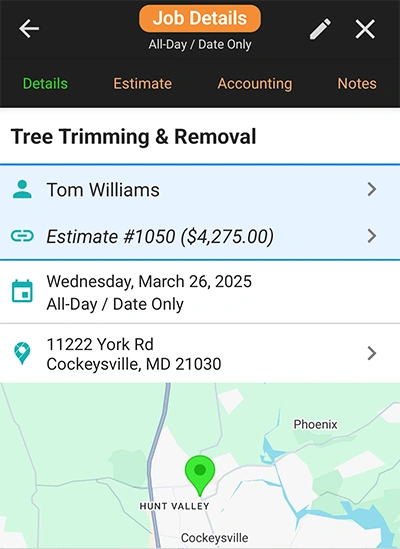
WorkQuote screenshot: a scheduled job and its field details.
See the WorkQuote job screen
WorkQuote keeps your daily view focused exactly on what you need to do next. From the moment you open the app, your active estimates, upcoming schedule, and unpaid invoices are right in front of you. No tapping through extra layers meant for a larger crew.
This is a WorkQuote screenshot. Use the links provided below to inspect the current Jobber interface.
A practical way to compare before switching
List every person who needs their own software login. If you need employee accounts, WorkQuote is not the right fit.
Compare the exact Jobber plan and user count you need with WorkQuote’s published plan prices; include payment-processing charges separately.
Test one representative estimate-to-invoice job in WorkQuote and confirm internet availability at the locations where you work.
Before changing systems, confirm that your required integrations, customer records, and current Jobber workflows have a migration path.
Official product information
Pricing, included features, and availability change. Sources reviewed October 13, 2026; confirm terms directly before purchasing.
Find answers to common questions about our field service comparison software.
It may be a fit if you manage your own customers and mainly need estimates, invoices, and owner-operated job scheduling. WorkQuote Core is free, and Pro adds unlimited estimates and invoices plus scheduling and other tools. WorkQuote does not support employee accounts or team access, so it is not a substitute for Jobber when you need staff logins or team dispatch.
WorkQuote Core is free. WorkQuote Pro is $19.99 month to month or $178.99 per year ($14.92 per month equivalent). Jobber Core is listed at $29 per month equivalent with annual billing or $49 with monthly billing for one user; additional users are listed at $29 per month on Connect, Grow, and Plus. Check Jobber’s current plan, user, and billing details before comparing.
No. WorkQuote is designed for individual owner-operators and does not support employee accounts or team access. A business that needs staff to sign in or be dispatched from the app should choose a product that explicitly supports those workflows.
WorkQuote lists an internet connection as a software requirement. Jobber says its loaded app can show a read-only cached schedule for that day, but editing and visit timers require internet. Confirm the current behavior for your field locations before choosing.
WorkQuote can connect to Stripe for online payments from invoices. Stripe processing fees and terms apply. Jobber has its own payment offering; compare the current rates and payout terms separately from the software subscription.
Try the WorkQuote mobile app
Explore the Guest Demo without creating an account.