Let’s be honest: you didn’t start a plumbing, landscaping, or HVAC business because you have a burning passion for data entry.
You started it because you’re a master of your craft. You fix things, build things, and solve problems. But somewhere between fixing a leaky pipe and installing a new fence, you realized that running a business involves a terrifying amount of paperwork. If you are currently sending estimates via text message or, heaven forbid, scribbling invoices on a notepad you bought at a gas station, this announcement is specifically for you.
At WorkQuote, we have spent years refining our mobile app to be the ultimate companion for field service pros. But we know that sometimes, you just need a quick, no-strings-attached solution to get a bid out the door. You might not be ready to download an app or create an account just yet. You just need to look professional now.
That is why we are thrilled to announce the launch of our two completely free, web-based tools: the Estimate & Invoice Generator and the Estimate & Invoice Manager.
No login. No credit card. No "free trial" that auto-renews at 3 AM. Just pure, unadulterated productivity right in your browser.
The "Napkin Invoice" is Costing You Money
We see it all the time in the home service industry. A brilliant electrician does $2,000 worth of work, but hands the client a handwritten bill that looks like a grocery list. What does that say to the client?
- ❌ It implies you aren't organized.
- ❌ It suggests your pricing might be made up on the spot.
- ❌ It makes tax season an absolute nightmare for you.
Perception is reality. When you send a crisp, digital PDF estimate with your logo on it, you can often command higher rates because you signal trust and professionalism. Our new tools are designed to bridge the gap between "guy with a truck" and "premier service provider."
1. The Free Estimate & Invoice Generator
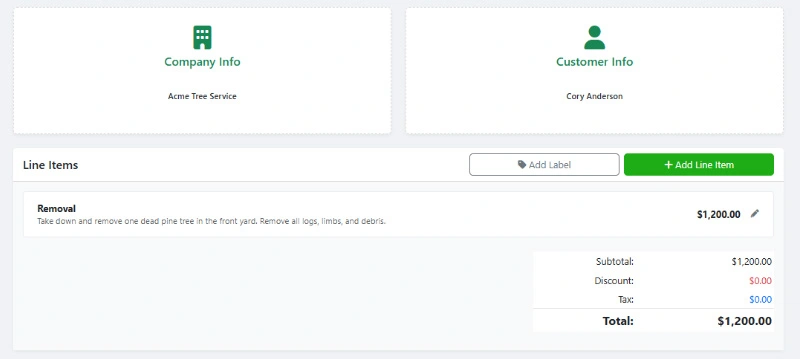
This is your instant gratification tool. Located at our new Generator Page, this tool allows you to build a stunning document in seconds.
How It Works:
You land on the page, and the interface is ready. You don't need to sign up. You simply plug in your logo, your business details, the client's info, and your line items. The tool automatically handles the math (including those pesky tax calculations) and generates a clean, downloadable PDF.
Key Features:
- Instant Branding: Upload your logo to make it yours.
- Dual Functionality: Toggle between "Estimate" and "Invoice" with a single click.
- Smart Calculations: Stop using a calculator on the side; we do the math for you.
- Currency Support: Whether you are in the US, Canada, or the UK, we've got you covered.
2. The Estimate & Invoice Manager Dashboard
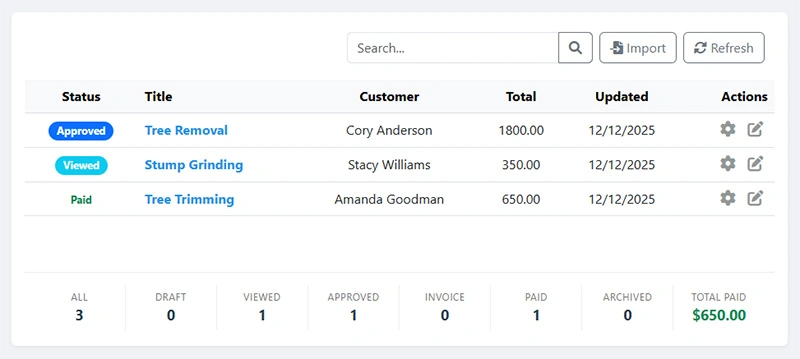
Generating a single invoice is great, but what happens when you have ten jobs in a week? You need a way to track them without creating a full account on a server. Enter the Manager Dashboard.
This is where our engineering team got a little clever. We built a dashboard that runs entirely in your browser using local storage. This means your data is saved on your device, allowing you to manage a list of estimates and invoices without ever creating a login/password combination.
Why Use The Manager?
Imagine you run a landscaping crew. You sent out five quotes on Monday. By Friday, you need to know:
- Who approved the quote?
- Who has paid?
- Who is ghosting you?
The Manager tool gives you a bird's-eye view of your status labels (Draft, Sent, Paid) so nothing slips through the cracks. It's a lightweight CRM (Customer Relationship Management) system that lives in your browser bookmarks.
5 Critical Elements Every Estimate Needs
Whether you use our new free web tools or our full mobile app, every estimate you send needs to protect your business. Here is the anatomy of a perfect quote:
Scope of Work
Be specific. Don't write "Fix sink." Write "Replace P-trap and supply lines in master bath."
Disclaimer / Terms
Always include a validity period (e.g., "Estimate valid for 30 days") to avoid price spikes in materials.
Payment Schedule
50% upfront? Net 30? Make sure the client knows exactly when money changes hands.
Contact Info
It sounds obvious, but ensure your phone and email are front and center.
Professional Branding
A logo establishes legitimacy. It shows you aren't a "fly-by-night" operation.

Why Are We Giving This Away?
You might be wondering, "WorkQuote sells a premium app. Why give away the core features for free on the web?"
It's simple: We believe in the growth of the trades. We know that when you are just starting out—maybe you just bought your first pressure washer or set of pro painting ladders—you need to keep overhead low. Subscriptions can be scary when cash flow is tight.
We want to help you grow. We provide these free tools so you can win more jobs and get paid faster. Eventually, your business will grow. You’ll have multiple employees. You’ll need advanced dispatching, expense tracking, and income reports.
When that day comes, we know you'll remember WorkQuote. But for now? The tools are yours. On the house.
When Should You Move from the Free Web Tools to the App?
The free web dashboard is powerful, but it relies on your browser's local storage. It's perfect for a single user on a single device. However, you should look at downloading the full WorkQuote app from the App Store or Google Play when:
- You need cloud sync: You want to start an estimate on your iPad at the job site and finish it on your phone in the truck.
- You need to track expenses: Keeping receipts organized for taxes is vital.
- You have a team: You need to schedule jobs for other people.
- You want deep analytics: Seeing your profit margins and growth trends over time.
Real World Scenarios
Here is how different pros can utilize these new free tools today:
The HVAC Technician: Just finished an emergency AC repair? Pull up the Generator on your phone, type in "Capacitor Replacement," add your labor, and email the PDF invoice to the homeowner before you even walk back to the van.
The Wedding Photographer: You have three couples asking for quotes. Use the Manager Dashboard to create three distinct estimates. Mark them as "Sent." When the first couple pays their deposit, flip the status to "Invoiced." Organized chaos!
Ready to Professionalize Your Business?
The days of carbon-copy paper pads are over. Your clients expect digital convenience, and your bank account deserves faster payments.
Head over to our free tools right now and create your first digital estimate. It takes less than two minutes, and it might just be the best administrative decision you make all year.